Run every Daraz store from one screen
Orders, AWB Pro Shipping Labels, listings, stock and real profit for all your Daraz accounts. No more switching between Seller Center logins.

Seller Center was built for one store. Your business has several.
A login for every store
- Log out, log in, repeat for every account to check orders
- The same product has a different SKU name in each store
- Payouts show sales and fees, not what you actually earned
- Stock lives in a spreadsheet that is always a day behind
One screen for all of it
- Orders from every store in one list, ready to pack and print
- Link each SKU to your product once, it works for every store
- Profit per order after Daraz fees, shipping and your cost
- Stock goes down by itself as orders come in, and up when you buy
Everything a Daraz seller does in a day
Built inside a working Daraz business that sells across several stores. Every screen answers a question sellers ask daily.
Dashboard: Daraz orders today
How many orders came in today on each store, with items, order value, how many are waiting to ship and when each store last synced.
90 days of orders on day one
Connect a store and SellerPoint brings in its last 90 days of orders by itself, then keeps them fresh every few minutes in the background.
All orders, every store
To pack, to arrange shipment, to hand over, shipping, delivered and returns from all your accounts in one list.
Shipping Label Plus
Print the day's shipping labels across stores in one go. A cutting line on each label, and under it your own product name or SKU, so packing mistakes drop close to 0%.
Copy products between stores
A product that sells in one Daraz account but is missing in another? Copy it across in one click from Store Overview.
Store Overview
Each product with every store under it: listed or not, price, Daraz stock, orders in 1, 7 and 30 days, profit and ROI.
SKU linking and SKU Database
Each store uses its own SKU names. Link them to your product or bundle once and every order, label and report follows that link.
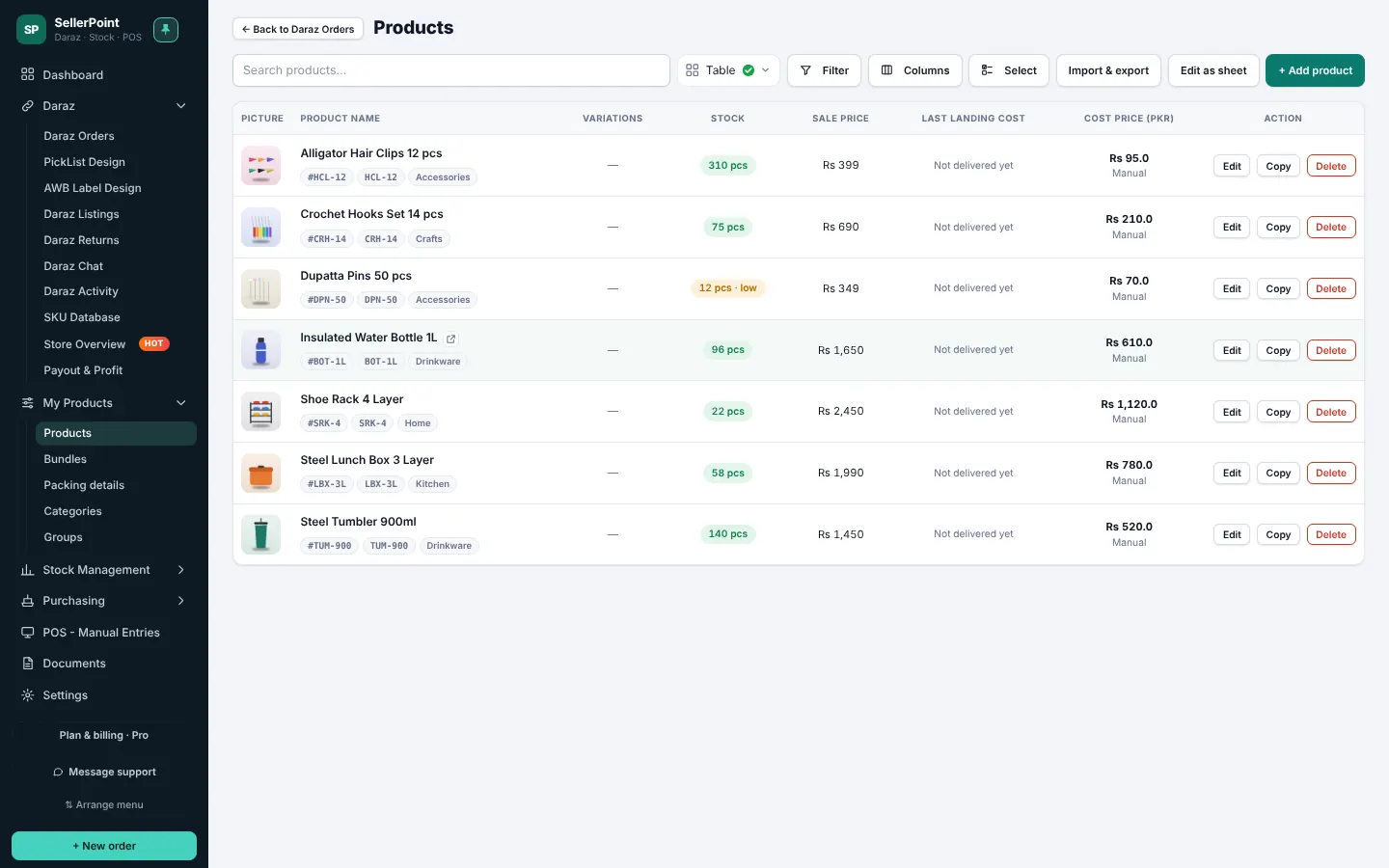
Products with real COGS
Cost price from the average of your purchases, your last purchase or a price you type, plus packing (bubble wrap, flyer, brown paper) for the true cost of goods sold.
Bundles
Sell packs made of your products. Each bundle has its own picture, packing and COGS, shows how many packs you can make, and which Daraz listings it is linked to.
Real-time profit on every delivered order
The moment an order is delivered, SellerPoint shows what it really earned: sale price minus Daraz fees, shipping, your product cost and packing.
Invoice-wise profit
Every Daraz invoice with all its deductions: commission, payment fee, shipping, handling and taxes, then your cost and packing, down to the real profit.
Payout and real profit
Daraz statements with every fee broken down, matched to your cost and packing, so you see what each item really earns.
Stock and forecasting
Stock goes down with every order and up with returns and purchases. Stock Forecasting shows what sells fast and when to buy again.
POS - Manual Entries
Record a shop sale, a return, a local purchase or damaged stock in seconds. Every entry becomes a document you can open, edit or undo.
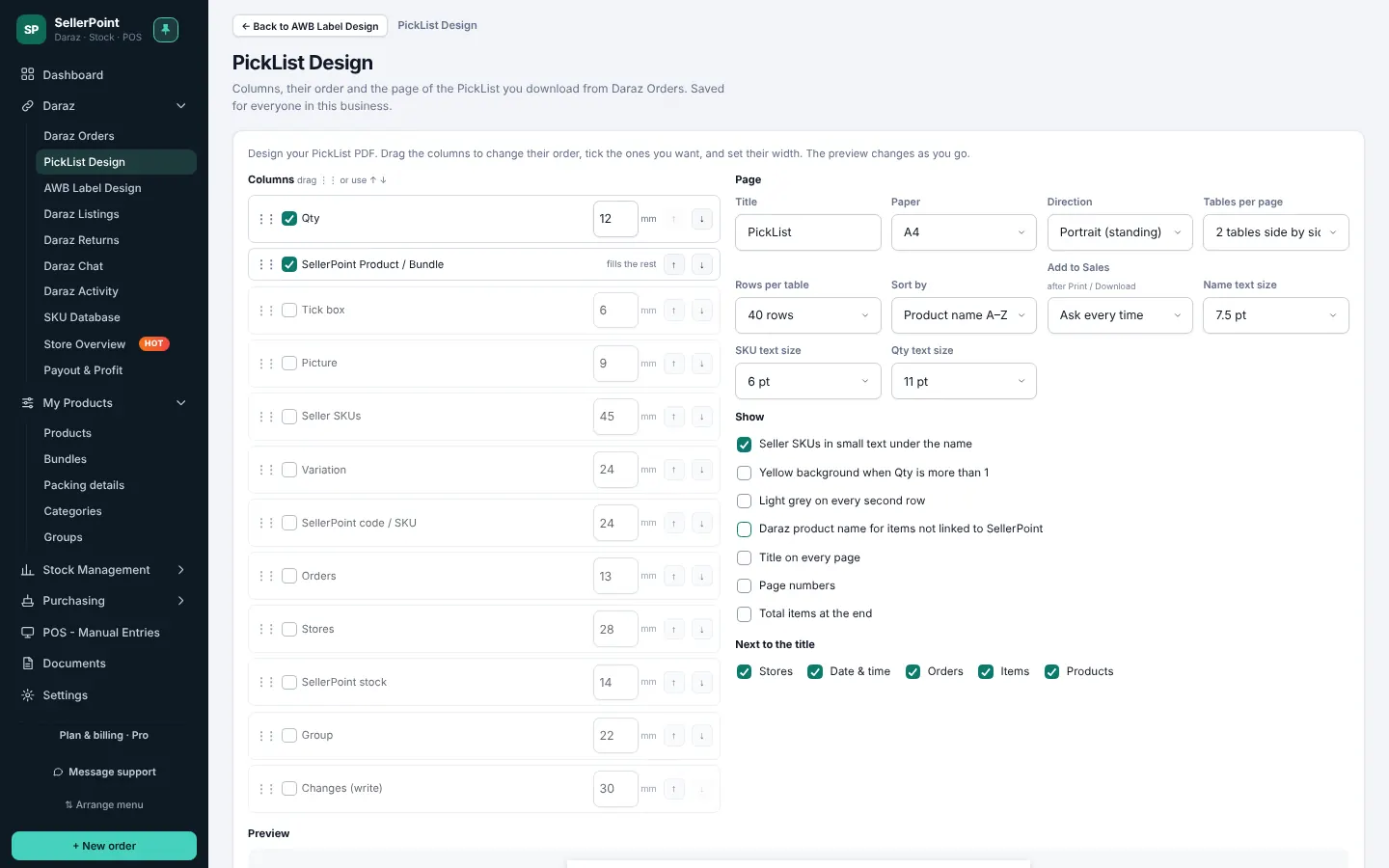
PickList Design
Lay out the PickList the way your packers like it: columns, paper size, rows per page and text size, so every item gets picked right.
Support inside the app
Message our team from the app with the topic, how urgent it is, the order number and screenshots. The reply shows right there.
See how each feature works
The same screens you get in the app, with what each one does for your Daraz stores.
Today's Daraz orders for every store, at a glance
Open SellerPoint and see how many orders each store got today, how many items, the order value and how many still need to ship.
- “+ Add Daraz account” and “Connect With Daraz” right on the Dashboard
- The last 90 days of orders come in by themselves when you connect a store
- A clear note while the first sync runs; it keeps going even if you close the app
- Last sync time per store, and “Sync now” whenever you want
All your stores' orders in one list
Stop logging in and out of Seller Center. Every order from every connected account lands in one list with its store name beside it.
- Tabs for To Pack, To Arrange Shipment, To Handover, Shipping, Delivered and Returns
- Search by order number, customer, product or SKU
- Background refresh every few minutes, plus a refresh button when you need it now
- PickList that groups the day's items by product, and adds them as one sale when you want

Shipping Label Plus: packing mistakes close to 0%
Print the day's Daraz shipping labels for every store in one go. Each label gets a cutting line, and under it you choose what to print: your own product name, the variation, or the SKU. The packer reads exactly what goes in the parcel.
- A clear cutting line on every label, with your own text under it
- Show your product or bundle name, variation and quantity, or the seller SKU
- Bulk print across all stores, or one store at a time, with no limit on any plan
- Choose the font, text size and weight; every PDF is kept to print again later

See each product across every store
One row per product, with a line for each store under it. You see straight away where it is listed, what it sells for, how much stock Daraz shows and how fast it moves.
- Listed or not, with one-click copy to a store where it is missing
- Price, Daraz stock, pending orders and 1, 7 and 30-day sales
- Profit, profit % and ROI from your real payouts
- Variation view that treats each colour or size as its own product

Copy a product from one Daraz account to another
Selling well in one store but missing in another? In Store Overview every store where a product is not listed is marked. Copy it to that account in one click instead of listing it again by hand.
- See at a glance which stores have the product and which do not
- Copy the listing to another of your Daraz accounts in one click
- No need to type the listing again by hand in Seller Center
- Works across all the accounts on your plan
Add, connect and link every store from the Dashboard
The same tumbler might be TMB-900-BLK in one store and TUMBLER900 in another. Link each SKU to your product once and SellerPoint uses that link for orders, stock and profit everywhere.
- Auto-match by SKU, barcode, short name or product code
- Change a link once and every store follows
- Filter by store to see which SKUs still need linking

Profit on each delivered order, in real time
You do not have to wait for the weekly Daraz statement. As soon as an order is delivered, SellerPoint works out what it really earned and shows it next to the order.
- Sale price minus Daraz commission, payment fee and shipping
- Minus your product cost (COGS) and packing, per piece
- Profit and margin for every order, store and product
- Matched to the real Daraz payout when the statement arrives
Profit for every Daraz invoice, with all deductions
Open any Daraz invoice and see exactly where the money went: every deduction Daraz made, your cost and packing, and the profit that is left.
- Commission, payment fee, shipping fee, handling fee and taxes, each on its own line
- Vouchers, returns and other adjustments included
- Your product cost (COGS) and packing for the items in that invoice
- Net payout, profit and margin per invoice, store and week
Know what each order really earned
SellerPoint reads your weekly Daraz payout statements and breaks every fee down per order. Add your product cost once and you see true profit per order, per product and per week.
- Statements by Daraz week, with paid and not-yet-paid status
- Commission, payment fee, shipping and other charges per order
- Old sales keep the cost of their own stock batch, so a new, dearer batch does not change last month's profit
Stock that keeps itself up to date
Stock goes down as orders come in and up when you receive goods or returns. Push the right quantity to each store so you stop overselling.
- Stock per product and per variation
- Low-stock and out-of-stock alerts
- Stock Forecasting: sales in the last 7 and 30 days, days of stock left and what to reorder
- Bring in products and stock from Excel in one go
Your own product list, with the real cost of every item
Keep one clean list of what you sell. Each product holds the details that matter for profit, and every Daraz listing links back to it.
- Name, category, SKU and barcode for each product and variation
- Cost price and packing cost, added together as cost of goods sold (COGS)
- Cost from: Auto (average of purchases), Last purchase, or Manual
- Product pictures can come straight from your Daraz listing
- Categories to group products and filter reports
- Bundles that sell several products as one listing and take stock from each part
- Packing details ready from day one (flyer, bubble wrap, brown paper in every size), with your own rates
Sales, returns, purchases and damage in one screen
Not everything happens on Daraz. Sell at your shop counter, take back a return, add stock you bought from a local market, or write off broken pieces. Pick the type, scan or search the products, press Done.
- Sale and Return with a receipt on screen, PDF or print
- Purchase adds stock at the price you paid; each batch keeps its own cost
- Damage takes stock out and counts the cost as a loss
- Every entry becomes a document you can open, edit like a sheet, or undo
- Local purchase orders with your supplier list

Bundles with their own picture, packing and COGS
Make a pack from your products, like a tumbler and a bottle together. SellerPoint works out the cost and how many packs you can make from stock.
- Picture by upload, link or paste, like products
- Packing (brown paper, bubble wrap, flyer) added to the COGS per pack
- Can make now, limited by the product with the least stock
- Mapped accounts: the Daraz listings linked to the bundle

A PickList laid out the way your packers like it
Choose the columns, their order and width, the paper and the text size. The preview updates as you change it, and it is saved for everyone in your business.
- Pictures, seller SKUs, variations and stock on the list
- A4 or other paper, portrait or landscape, two tables side by side
- Add the PickList to sales when you download it, if you want
Help from inside the app
Press Message support in the menu and the Support page opens right in the app. Our answer appears in the same place, and you get an email too.
- Pick the topic and how urgent it is
- Add the Daraz store and order number, and attach screenshots or PDF
- Quick answers to common questions
- Close the ticket when it is solved and tell us how we did

Real screens from SellerPoint
No drawings. These are the screens you work in every day, with demo stores.
From sign up to your first label in about ten minutes
Create your account
Name, email and a password. Your 3-day trial starts right away.
Add your Daraz accounts
On the Dashboard press “+ Add Daraz account”, then “Connect With Daraz” and approve on Daraz's own screen. Up to 3 in the trial.
Let the first sync run
The last 90 days of orders come in by themselves. A big store takes up to about 30 minutes the first time; after that it is fast.
Link your products
Auto-match links most SKUs for you. Fix the rest once and start packing.
Pay for the stores you run
Every plan has every feature and unlimited AWB Pro Shipping Labels. The only difference is how many Daraz accounts you connect.
Starter
2 Daraz accounts
- All features
- Unlimited AWB Pro Shipping Labels
- Real-time profit for each delivered order
- Invoice-wise profit with all Daraz deductions
- Copy products between stores
- Unlimited orders and listings
- Last 90 days of orders on day one
- POS - Manual Entries and Documents
Growth
3 Daraz accounts
- All features
- Unlimited AWB Pro Shipping Labels
- Real-time profit for each delivered order
- Invoice-wise profit with all Daraz deductions
- Copy products between stores
- Unlimited orders and listings
- Last 90 days of orders on day one
- POS - Manual Entries and Documents
Pro
5 Daraz accounts
- All features
- Unlimited AWB Pro Shipping Labels
- Real-time profit for each delivered order
- Invoice-wise profit with all Daraz deductions
- Copy products between stores
- Unlimited orders and listings
- Last 90 days of orders on day one
- POS - Manual Entries and Documents
Custom
More than 5 Daraz accounts
- Pro plan for 5 accounts
- Add any number of accounts
- Same features, unlimited labels
Connect up to 3 Daraz stores. Your last 90 days of orders come in on day one. No card needed, and your setup stays when you pick a plan.
What sellers ask before they start
Is SellerPoint an official Daraz product?
No. SellerPoint is an independent tool built for Daraz sellers. It connects to your stores through the Daraz Open Platform, the official route Daraz offers for seller software. You approve the connection on Daraz's own login screen, and you can remove it any time.
Do I have to give you my Seller Center password?
Never. When you connect a store you log in on Daraz's page, and Daraz gives SellerPoint a secure access key for that store only. We never see or store your password.
How many Daraz accounts can I manage?
Plans cover 2, 3, 5 accounts. Above 5, the custom plan adds one account at a time for $2.99 a month each, so you pay for exactly the stores you run.
How much order history do I get?
When you connect a store, SellerPoint brings in the last 90 days of its orders by itself. The first sync takes a few minutes (up to about 30 for a big store) and carries on even if you close the app. After that, new orders arrive every few minutes.
What happens when the 3-day trial ends?
The app pauses until you pick a plan. Your orders, links and settings stay saved, so when you choose a plan you carry on from where you stopped.
What is Shipping Label Plus?
It is how SellerPoint prints your Daraz shipping labels. Each label gets a cutting line, and under it your own product name, variation and quantity, or the SKU, so the packer knows exactly what goes in the parcel and mistakes drop close to 0%. Every plan prints as many labels as your orders need, in bulk or one by one, with no per-label charge.
Can I add sales and stock that do not come from Daraz?
Yes. POS - Manual Entries records shop sales, customer returns, local purchases and damaged stock. Each one updates stock, prints a receipt where needed and is saved as a document you can open and edit later.
How do I get help?
Press Message support inside the app. You can pick the topic and how urgent it is, add the Daraz order number and attach screenshots. Our reply shows right there, and you get an email too.
Try SellerPoint on your own Daraz stores
3 days free with up to 3 stores. No card needed. Keep everything you set up when you pick a plan.